
Introduction
Between YouTube tutorials and AI coding assistants, traditional documentation can look obsolete. Yet developers continually rely on technical documentation as their primary resource when building systems and resolving issues. While tools like ChatGPT provide valuable assistance, they cannot match the comprehensiveness and currency of quality documentation.
A recent exploration of cloud platform documentation highlighted this reality. After years of positive experiences with AWS documentation, the author encountered significant navigation challenges with Azure’s documentation structure, prompting investigation into what makes documentation truly effective.
When Less is More in Cloud Documentation
The comparison begins with how both platforms present object storage services. AWS’s S3 documentation page features a clean, organized interface with clearly labeled sections, primarily user guides and API documentation. Navigation feels intuitive; developers quickly understand whether they need standard S3 functionality or specialized archival storage.
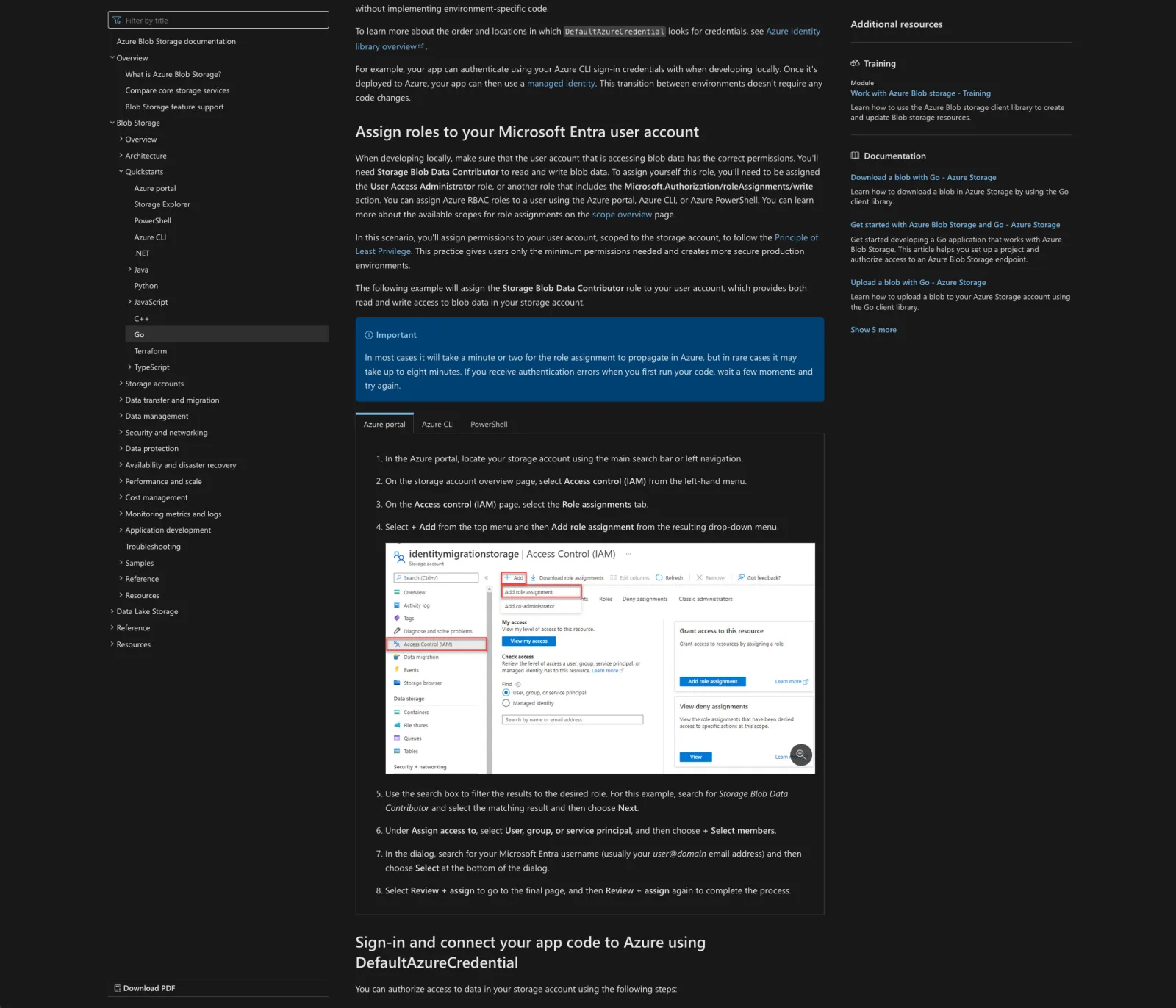
Azure’s equivalent page presents an overwhelming array of options: architecture diagrams, getting-started guides, application development tutorials, and additional resources. While comprehensive, this abundance of information creates friction for developers seeking specific guidance.
The visual contrast is stark: The simplicity of the AWS web design against the overwhelming Azure page illustrates how presentation affects user experience.
Practical Example: Object Storage Implementation
AWS Approach
AWS’s implementation path resembles a well-marked hiking trail. Their user guide opens with scannable introduction to S3, naturally progressing through “Getting Started” and bucket creation. The 17-step bucket creation guide addresses technical elements like Object Lock, encryption, and versioning with convenient links for deeper investigation. SDK implementation guidance flows naturally from “Developing with Amazon S3” directly to SDK documentation and code examples.
Azure Approach
Azure’s path resembles navigating a complex transit system without a map. Storage account creation immediately presents multiple account type options:
- Standard general-purpose v2
- Premium block blobs
- Premium file shares
- Premium page blobs
- Legacy standard general-purpose v1
- Legacy blob storage
Account creation involves multiple tabs: Basics, Advanced, Networking, Data Protection, Encryption, Tags, and Review/Create. While information is thoroughly documented with helpful cross-platform references (PowerShell, CLI) and detailed screenshots, the density can overwhelm. Container creation requires backtracking to quickstart guides, though the six-step process itself includes clear visuals.
SDK Integration Comparison
AWS SDK Documentation
AWS maintains their pattern of clear navigation. The Golang SDK documentation provides logical progression: Getting Started section efficiently covers installation, access key setup, and practical examples of listing bucket objects. However, searching for specific upload functionality reveals a limitation, a non-functional search feature forces manual navigation through code examples. While eventually accessible through the repository’s readme file, which provides clear examples of common operations including uploads, the path is less intuitive than expected.
Azure SDK Documentation
Azure’s SDK documentation initially appears to stumble by requiring developers to clone a Git repository rather than providing inline code samples. This initially feels counterintuitive, as many developers prefer understanding concepts within their own project context.
However, Azure’s documentation demonstrates unexpected value through comprehensive, end-to-end workflow demonstration. It methodically guides developers through the complete lifecycle: container creation, blob uploads, content listing, file downloads, and cleanup procedures. Clear links to advanced blob operations and management techniques make it a surprisingly complete way to learn.
Final Analysis
The comparison reveals an interesting paradox in technical writing:
AWS Strengths:
- Clean interface and intuitive navigation
- Quick information discovery
- Minimalist approach aids rapid orientation
AWS Limitations:
- Code examples occasionally lead to unexpected destinations
- Less continuous content flow
Azure Strengths:
- Comprehensive, exhaustive information presentation
- Complete end-to-end workflow demonstrations
- Thorough cross-platform references
Azure Limitations:
- Busy layout with dual sidebars creates visual noise
- Comprehensive approach can hinder comprehension
- Fragmented code examples require mental assembly
Neither approach is definitively superior; they reflect different documentation philosophies. AWS prioritizes clarity and navigation potentially at the cost of content continuity, while Azure emphasizes completeness at the expense of digestibility. Preference depends on user background, long-time Azure users may navigate complexity with ease, while AWS’s straightforward approach appeals to newcomers or those valuing directness.
The comparison raises broader questions: What makes documentation truly effective? Is it navigability, comprehensiveness, visual clarity, or a balanced combination? The answer, like the platforms themselves, depends on the person asking. For more on choosing cloud platforms and architectures, see our cloud-first concepts guide or our comprehensive guide to cloud migration.
Cloud solutions expert helping companies transform their infrastructure and accelerate development.
Work with Amelia →